
Keyring
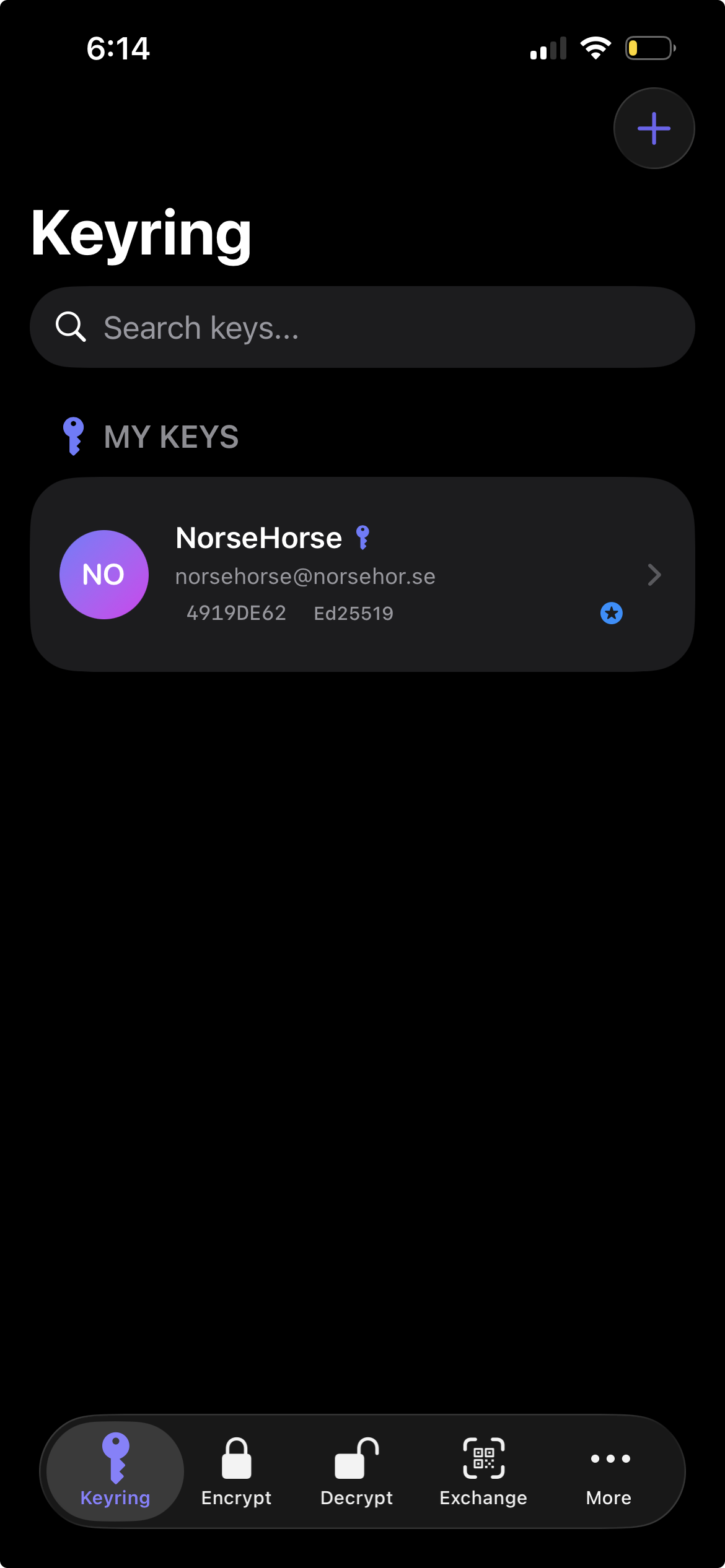
Generate modern OpenPGP v6 (RFC 9580) or classic v4 key pairs — Ed25519 + X25519/Cv25519 — or import existing GnuPG/OpenKeychain keys. RSA and DSA supported for legacy interop.
OpenPGP for iOS and Android. Now you can generate your key on the card itself —
born on a YubiKey 5 or Token2 over NFC, the private key never touches the phone — with full
hardware-key card management, passphrase-only encryption, and a read-only pass viewer.
The cryptography is open source. No accounts. No tracking. Your keys never leave your device.
PGPony's OpenPGP core is open source on both platforms under Apache-2.0. Don't trust us — read the parser, the packet builder, the key generation. The same code that seals your messages is yours to audit.
$ open source now · audit-ready later — read the full story →
Five tabs on iOS, six on Android. Every tool you need, no bloat.
Generate modern OpenPGP v6 (RFC 9580) or classic v4 key pairs — Ed25519 + X25519/Cv25519 — or import existing GnuPG/OpenKeychain keys. RSA and DSA supported for legacy interop.
Pair an OpenPGP NFC smartcard — YubiKey 5 series or Token2 — and sign, decrypt, and encrypt-and-sign with a key that never leaves the card. Authorized by your PIN and a tap.
New. Generate a fresh Ed25519 + Curve25519 keypair directly on the card over NFC. The private key is born on the token and never touches the phone — the strongest story in mobile PGP.
New. Change the admin and user PINs, unblock a locked PIN, and factory-reset a card — all over NFC, right from the app. Full lifecycle control of your OpenPGP smartcard.
New. Encrypt with just a passphrase — gpg -c style, no keypair required. Perfect for sealing a file for yourself or sharing a secret over a channel you both already trust.
New. Browse and decrypt your existing pass (password-store) entries, hardware-key-backed. Read-only and on-device — a PGP tool that reads pass, by design.
Authenticated encryption (AEAD-OCB) for v6 recipients, with SHA-256 fingerprints and Argon2 passphrase protection. PGPony picks v6 or v4 automatically so older contacts still work.
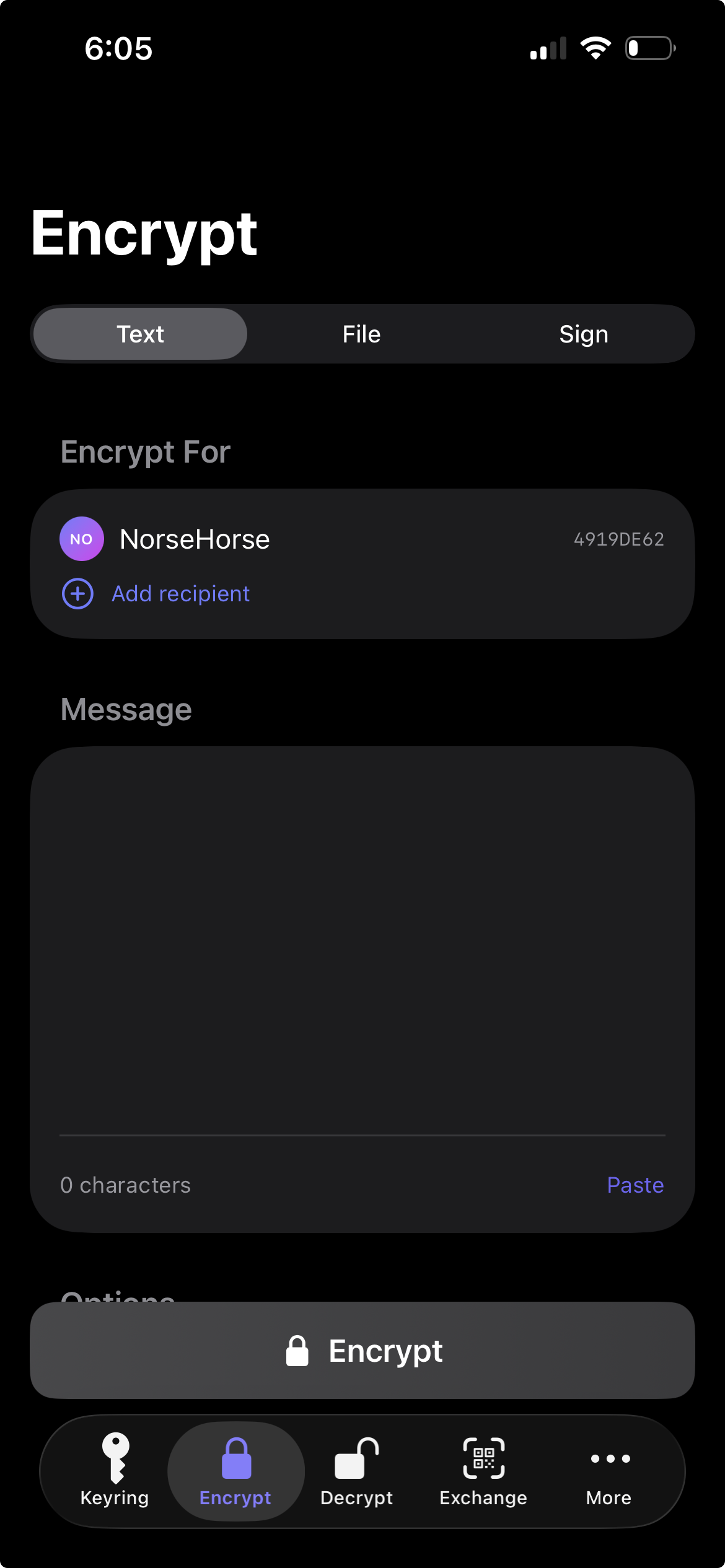
One or many recipients. SEIPDv2 authenticated encryption for v6 keys, ASCII armor for chat, binary for attachments. Optional signing in the same step — clear-signed or detached.
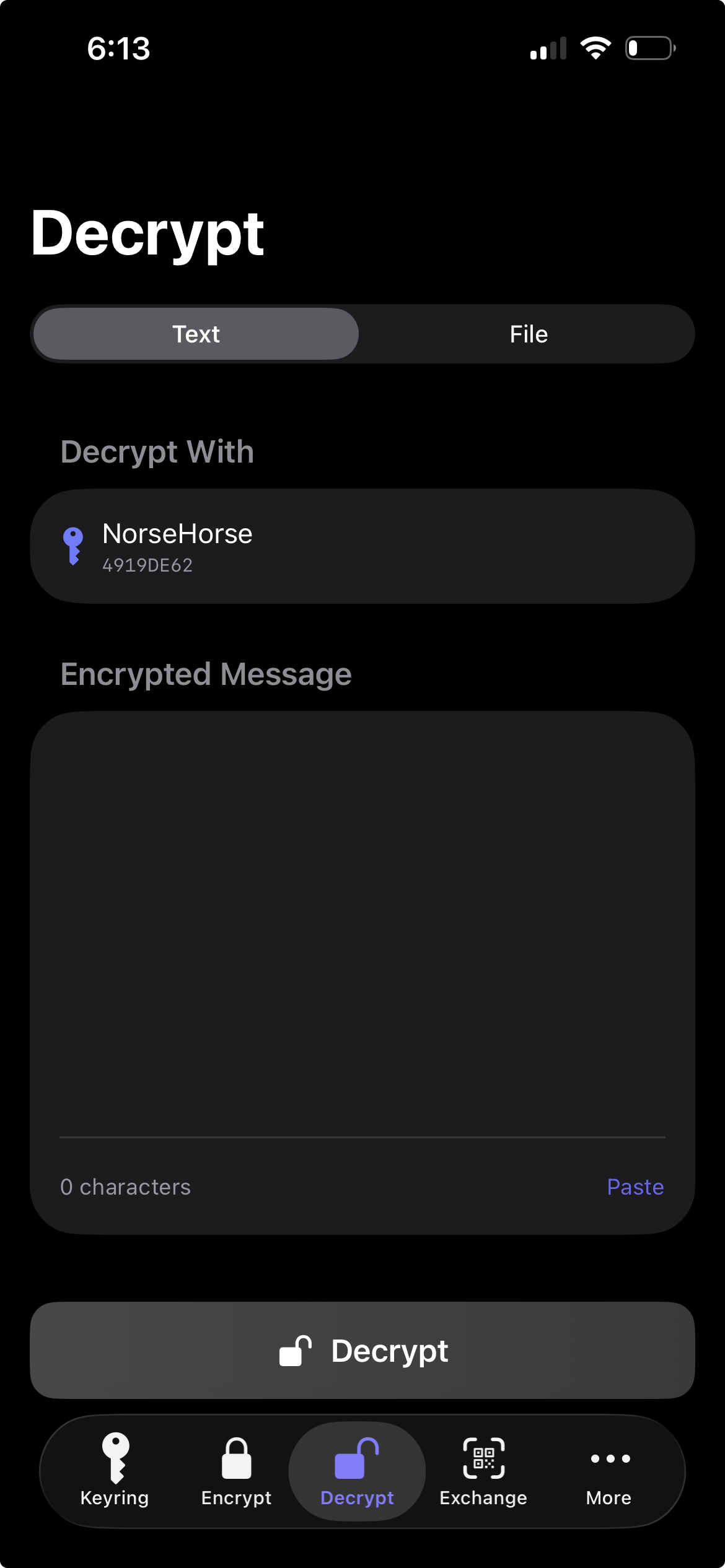
Paste armored text or share an .asc / .pgp / .gpg file from any app. Signature verification is automatic.
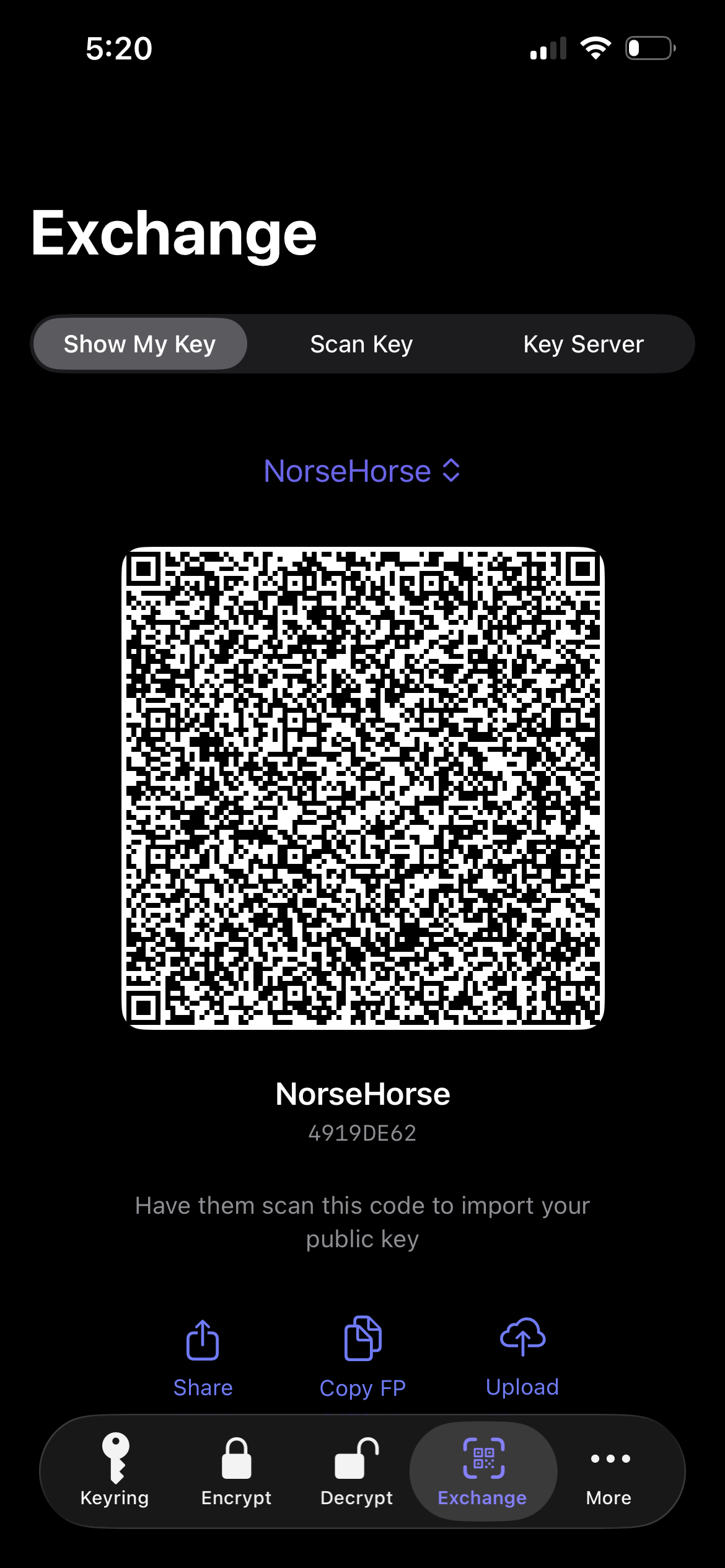
Turn your public key into a QR code. The other person scans it. No typing, no copy-pasting, no email round-trips.
Look up any key by email via Web Key Directory — keys served by the recipient's own mail domain. Falls back to keys.openpgp.org.
Encrypt or decrypt from any app — Mail, Files, Messages — without opening PGPony. Tap Share, pick PGPony, done.
Match imported PGP keys to your iOS / Android contacts by email. Photos and names auto-populate.
Face ID, Touch ID, Optic ID, or fingerprint. Optional second prompt before every decryption.
Optional. End-to-end encrypted by Apple, readable only on devices signed into your iCloud account. Off by default.
Local notifications at 30, 7, and 1 day before any key expires — and on the day itself. Never get caught with a dead key.
Configurable countdown clears decrypted text from the clipboard automatically. You can watch the timer if you want.
English · Deutsch · Español · Français · 日本語 · Português (Brasil). Detected from your device on first launch.
PGP has confused new users for 30 years. PGPony does not.
One tap. You get a public key to share with anyone, and a private key that never leaves your device.
QR code, .asc file, clipboard, or publish to keys.openpgp.org. All four methods are one tap.
Scan their QR, paste their armored block, or look them up via WKD by email. Now you can write to them.
The result is safe to copy into any chat, email, or text. Only the recipient's private key can open it.
Receive encrypted tips on your phone. Decrypt with biometrics. Keys stay on-device — even if your laptop is seized.
Coordinate without trusting a single messaging app. PGP travels over any channel — email, SMS, even a public forum post.
Read encrypted email or signed commits from a coffee shop. Full GnuPG interop — bring your existing key, sign and verify from your phone.
Decrypt config files and passwords shared by your team without unlocking a laptop. Share Sheet handles it in three taps.
Send and receive client / patient information with mathematically enforced confidentiality. No vendor in the middle.
You don't need a reason to want your messages to be unreadable to anyone but the recipient. PGPony makes it free and simple.
Calmly designed, and native on both iOS and Android.
That's the whole list. Every network feature is opt-in and clearly labeled. There is no analytics SDK, no telemetry, no crash reporter, no advertising ID.
You never sign up for anything. There is no "PGPony account." There is no server with your data on it.
Zero analytics. Zero telemetry. Zero ad SDKs. Verify it yourself in iOS Settings → Privacy & Security → App Privacy Report.
PGPony speaks the OpenPGP standard. Export your keys at any time and use them in GnuPG, Thunderbird, OpenKeychain, anywhere.
A real OpenPGP implementation, not a wrapper around a black box.
gpgsq) and the RFC 9580 Appendix A test vectorsgpg --version 2.4.xDifferent tools for different threats. Here's where PGPony fits.
| PGPony | Signal | ProtonMail | iPGMail | OpenKeychain | |
|---|---|---|---|---|---|
| OpenPGP standard | ✓ v4 full · v6 (RFC 9580) full | ✗ | ✓ v4 | ✓ v4 | ✓ v4 |
| Hardware security keys (NFC) | ✓ YubiKey 5 · Token2 | ✗ | ✗ | ✗ | ✓ |
| On-card key generation | ✓ born on the card | ✗ | ✗ | ✗ | ✗ |
| Open-source crypto core | ✓ Apache-2.0, both platforms | ✓ | ✓ clients | ✗ | ✓ |
| iOS + Android | ✓ both | ✓ | ✓ | iOS only | Android only |
| Works over any channel | ✓ | ✗ Signal only | ✗ email only | ✓ | ✓ |
| No account required | ✓ | phone # | email signup | ✓ | ✓ |
| Bring-your-own GnuPG key | ✓ | ✗ | ✓ | ✓ | ✓ |
| QR code key exchange | ✓ | safety # | ✗ | ✗ | ✓ |
| WKD lookup | ✓ | n/a | ✓ | ✗ | ✗ |
| Share Sheet / intent | ✓ | ✗ | ✗ | ✓ | ✓ |
| Biometric lock | ✓ | ✓ | ✓ | ✓ | passphrase |
| No analytics, ever | ✓ | ✓ | ✓ | ✓ | ✓ |
| Price | free | free | freemium | paid | free |
Signal and ProtonMail are excellent at what they do — PGPony fills a different niche: portable, channel-agnostic, standards-based encryption you control end-to-end.
Seems like a really great product; easy to use, i love the dev's ethos, app has possibly the cleanest / my favorite UI compared to apps with similar functionality. However, 1. I wish it was a one-stop crypt app w/ stenography options on the roadmap and alternatives to PGP for encryption. 👑 2. Merging all functionality from the dev's other app AgePony would streamline into a fantastic suite single app. ☝️ 3. Unfortunately, without being open sourced it can never be used seriously, or by the people in danger who need it most, even with an audit. ⚠️ 4. Only being available on official app stores is similarly confusing and disappointing. 💔 💰 With a weirder set of encryption options as a suite, I would feel comfortable with a one time license to unlock advanced features / add modules.. IF it was an open source suite via apk direct download.
Best place to review is your app store — App Store · Google Play
Yes. Encryption happens locally on your device using your recipient's public key. Only the holder of the corresponding private key can decrypt the result. PGPony has no server in the path and no ability to read your messages.
Yes — that's the whole point. Import your existing OpenPGP key (Ed25519, Cv25519, RSA, or DSA) and it round-trips perfectly with gpg 2.4+. You can encrypt on your phone and decrypt on your laptop, or vice versa.
If you had iCloud Keychain sync turned on, your keys are restorable on a new device signed into your Apple ID. Otherwise, your keys are gone and so is anything encrypted to them — that's the point of strong encryption. Always back up your private key somewhere safe (a password manager export, an encrypted USB drive, paper in a safe).
Signal is the best secure messenger on the planet — but it only works inside Signal. PGPony encrypts arbitrary text and files, which you can send through any channel: email, SMS, Slack, a paste site, a public forum. Use Signal for everyday chat. Use PGPony for everything else.
The standard is old — RFC 4880 is from 2007 — but it's also open, portable, and updated. RFC 9580 (2024) modernized the whole stack with Ed25519, X25519, SEIPDv2 authenticated encryption (AEAD-OCB), and Argon2. PGPony supports both: full v4 (generate, encrypt, sign, decrypt, verify) and full OpenPGP v6 — including v6 key generation, encrypting to v6 recipients with SEIPDv2, and v6 signing and verification.
Yes — fully. You can create OpenPGP v6 keys (an Ed25519 primary with an Ed25519 signing subkey and an X25519 encryption subkey), encrypt to v6 recipients with SEIPDv2 authenticated encryption, and sign and verify with v6 keys. A picker on the Generate screen lets you choose v6 or classic v4. PGPony's v6 output has been verified against Sequoia (sq), a reference RFC 9580 implementation, and against the official RFC 9580 Appendix A test vectors.
Yes. Pair an OpenPGP NFC smartcard and PGPony will use it for private-key operations — sign, decrypt, encrypt-and-sign, and edit key expiration — with the private key never leaving the card. Each operation is authorized by your card PIN and a tap. You can also change the card PIN from the key's detail screen, and signed messages decrypted on a card show a verified-signer badge. Hardware-key support was validated end-to-end on YubiKey 5 NFC and Token2, cross-checked with GnuPG. The card must hold ECC keys (Ed25519 signing, Curve25519 encryption); RSA-only cards aren't supported, and your phone needs NFC.
Yes. PGPony can generate a fresh Ed25519 + Curve25519 keypair on the card itself over NFC — the private key is created on the token and never exists on the phone. This is the strongest form of hardware-key protection: there is no on-device copy that could leak. You can still import an existing key to a card if you prefer, and full card management (admin PIN change, unblock, factory reset) is built in.
The cryptographic core is — fully, under Apache-2.0, on both platforms: PGPonyCore (Swift) and PGPonyCore-Kotlin (Kotlin). That is the part that matters for trust: key generation, the OpenPGP packet parser and builder, and the encryption and signing paths. You can read it, build it, and audit it. The app shells around the core (UI and platform glue) stay closed, but the math that seals your messages is public. See the open-source page.
For v4 keys, yes — byte-exact, verified against gpg 2.4.x. v6 keys and v6-encrypted messages interoperate with RFC 9580 implementations such as Sequoia, but current GnuPG does not yet implement RFC 9580 v6, so a v6 key or message won't work with GnuPG today. The rule of thumb: choose v6 for the strongest, most modern crypto and Sequoia-class interoperability; choose v4 if you need to exchange with GnuPG users right now.
v6 (RFC 9580) modernizes several things over v4 (RFC 4880): fingerprints use SHA-256 instead of SHA-1; messages use SEIPDv2 authenticated encryption (AEAD-OCB), which cryptographically detects tampering, instead of v4's bolt-on MDC; Ed25519 and X25519 are represented natively without the legacy OID wrapping v4 needed; and secret keys can be protected with memory-hard Argon2. v4 remains the most broadly compatible format — notably the one GnuPG users can exchange with today.
Not yet. PGPony is iOS + Android only today. Since PGPony is fully standards-compliant, your existing desktop OpenPGP setup (GnuPG, Thunderbird, Kleopatra, GPG Suite) works perfectly alongside it.
No. PGPony is free to download and use. No subscriptions, no IAPs, no ads, no upsells. Just an app a solo developer made because mobile PGP deserved better.
It prevents anyone who picks up your unlocked phone from opening PGPony without authenticating. It does NOT add cryptographic protection to your keys — they're already encrypted at rest by the OS. There's also an optional second prompt before every decryption, for high-stakes scenarios.
No, by default. Optional features hit external servers: WKD lookups query the recipient's mail domain, HKP search queries keys.openpgp.org over TLS 1.3, and iCloud sync uses Apple's end-to-end encrypted keychain. Every one of these is opt-in. The app contains no analytics SDKs, no crash reporters, and no advertising IDs.
Free. No accounts. No tracking. Works with everything that speaks OpenPGP.